Prism Tricks #1
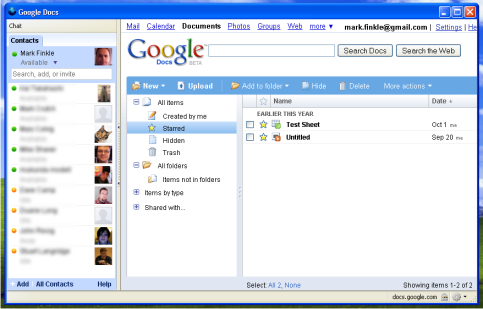
Here’s a simple way to extend a web application with Prism: Create a simple mashup by adding a sidebar.
Prism supports a simple sidebar that can display a secondary web application. Just enable the sidebar in the configuration and load content into the sidebar using some scripting. Here’s the example:
webapp.ini
[Parameters]
id=sidebar.test@prism.app
uri=https://docs.google.com
sidebar=yes
webapp.js
function startup() {
  host.sidebar.add("Chat", "http://talkgadget.google.com/talkgadget/popout");
  host.sidebar.visible = true;
}
Take those to files and make a bundle, name it sidebar.webapp and open it using Prism. On Windows and Mac, you should be able to double-click the webapp bundle. On Linux (or from a terminal) use: prism -webapp [path-to-bundle]
You should see Google Docs loaded with Google Talk in the sidebar! Something like this: