Firefox 3 - Offline App Demo - Part 2
Last year (wow, that long ago?) I made a simple demo to show Firefox 3 offline capabilities. A lot has changed between then and now. Firefox 3 offline capabilities changed significantly to align better with WHATWG offline specification. The biggest changes involve dropping support for our own mechanism and supporting WHATWG manifests and application cache. The specification gives some details on how it works. There is an MDC article on using offline resources in Firefox 3.
Since so much has changed, I decided to update the demo application. Here is the overview of the application, updated where needed:
A Simple Demo - Task Helper
The application is a simple task list system. The current functionality includes:
- Add tasks - Enter text in field and press ‘Add’
- Complete tasks - Mark completed tasks and press ‘Complete’
- Remove tasks - Mark tasks and press ‘Remove’
- Data is stored as JSON and XHR is used to interact with server (PHP)
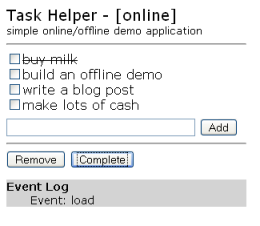
Nothing fancy. However, the application is “offline-aware”, meaning:
- Application resources (HTML & JS) are listed in the offline cache manifest. This manifest must be served as “text/cache-manifest” and follow the manifest rules.
- Before interacting with server, online status is checked. If online, use XHR. If offline, use DOMStorage.
- Online/Offline status is monitored using events. When the application switches from offline to online, data is resync’ed with the server.
There is really nothing fancy about the offline stuff either, but putting it all together does make for a neat application. Using the latest Firefox 3 (beta 5 or nightly), you should be able to:
- Use the application while online.
- Go offline using the “Work Offline” menu. The event log should show that the app went offline.
- Continue to use the application while offline.
- Restart browser.
- Switch to offline (or have no network connection).
- Enter URL to app (or use a bookmark).
- Start using app with data from last session.
- Switch to online. The event log should show that the app is back online and has updated the server with any offline changes.
Try it: Task Helper Source code: todo-offline.zip
Note: The data is stored in a simple, shared JSON file on the server, managed with a simple PHP file and reset every hour. No fancy databases with multiple session support.