Updating Add-ons in Firefox Mobile 1.1
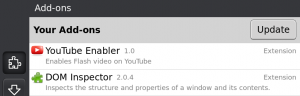
In previous versions of Firefox Mobile, you could check for and install updates for your add-ons by pressing the “Update” button in the Add-ons Manager. This meant that you could check whenever and as often as you wanted, but, if you didn’t really want to manage these things manually, you could find yourself without the latest versions.
Desktop versions of Firefox will prompt you that a new version of an add-on is available. Maybe this prompt is enough for you to actually update the add-on, maybe it isn’t. Maybe you find the whole process annoying and/or boring.
In Firefox Mobile 1.1, we introduce automatic add-on upgrades. Once a day, Firefox will check your add-ons for an update and if an update is found, we download and install the new version. If you’re interested, you can go to the Add-ons Manager and see what add-ons have been updated. If you’re eager to use the new add-on, you can restart. In the future, some add-ons may not even need a restart.
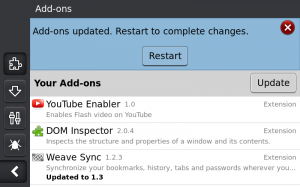
Of course, you can still use the “Update” button to force add-ons to update right away, without waiting for the next automatic check.
If you want to turn off automatic add-on updates, you can use about:config and set extensions.autoupdate.enabled to false. If you’d like to change the timing for automatic updates, set extensions.autoupdate.interval to a different number of seconds.